Musician Website: What to Put on It, With Examples From 73 Artist Sites (2026)
What a musician website needs and in what order, from 73 official artist sites we checked: the sections they share, examples by genre and a checklist.
On this page
A musician website needs five things: your latest release with links to listen, your show dates with ticket links, a way for fans to sign up, your videos and a contact for booking. Put the music first. That's what most official artist sites do: we checked 73 of them, and 38 open with the music.
Below: what those sites have in common, the order that works, what to skip when you're starting out, examples by genre and a checklist.
What to put on a musician website
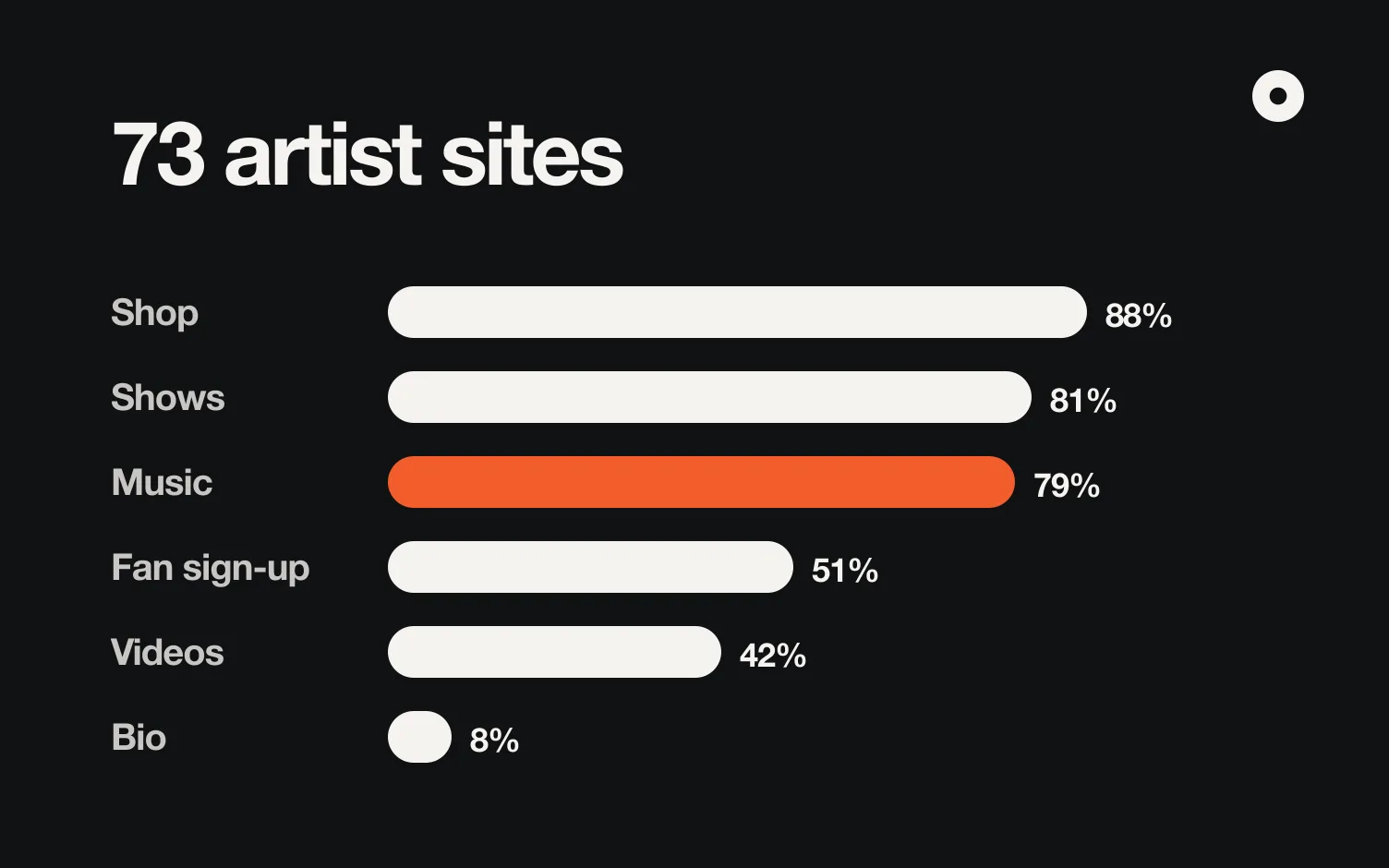
In October 2026 we opened 104 official artist sites across eight genres, from Jack Harlow and Victoria Monét to Four Tet and Peso Pluma. 73 loaded; the rest were down, parked or redirected. This is what the 73 put on their home page:
Verified: 2026-10-22
| Section | Sites that have it | Why it's there |
|---|---|---|
| Shop or merch | 64 of 73 (88%) | Big artists sell; many of their sites are mostly a store |
| Shows | 59 of 73 (81%) | Fans and promoters both look for the next date |
| Music | 58 of 73 (79%) | The latest release, with buttons to every platform |
| Fan sign-up | 37 of 73 (51%) | An email list is the one way to reach fans without a feed in between |
| Videos | 31 of 73 (42%) | Usually one embed, or a short grid |
| Bio or about | 6 of 73 (8%) | Almost none of them have one on the home page |
The median site has four sections. The smallest has one, the largest eight.
Three things almost all of them share:
- One main button, and it's the music. 37 of 73 make "Listen", "Stream" or "Pre-save" the main call to action; the next most common is the shop (31) and then tickets (23).
- One or two fonts. 67 of 73 use one display face with character and one plain sans. The color comes from the latest cover.
- A short menu that folds on phones. Four to six items (Music, Tour, Shop, Video, Sign up), and on every site we checked on a phone, a menu button instead.
The order that works
The order that repeats across genres is: latest release, shows, videos, fan sign-up, contact. When a site has both music and a shop, 38 of 52 put the music above the shop.
For an independent artist, that order does a job:
- Latest release answers the first question anyone has: what does this artist sound like now?
- Shows turn a listener into someone in the room. Show the next dates with a ticket button; skip past dates unless you have few upcoming ones.
- Videos show you live or on camera, which is what a promoter checks.
- Fan sign-up keeps the people who liked you. Ask for an email and a city, so you can write to the right fans before a show (how to start an email list).
- Contact for booking and management, at the bottom or in the footer, where promoters expect it.
What to skip when you're starting out
The big sites are built for artists with stores, tours and teams. Some of what they do doesn't carry over:
- A shop as the home page. 16 of the 73 open with merch. If you don't sell merch yet, leave the section out instead of showing an empty store.
- Concept worlds. A 3D room or a fake desktop works for an artist people already search for by name. For someone who found you once, it hides the music.
- A long bio. Only 6 of 73 have one on the home page. Two sentences under your name are enough; the long version goes in your press kit.
- Empty sections. A Tour heading with no dates looks worse than no Tour section.
Musician website examples by genre
What stood out on each site the day we checked. Sites change with every release, so open them to see the current version.
| Genre | Example | What it does well |
|---|---|---|
| Hip-hop | Jack Harlow | Dark type, one card for the single, then Music, Videos, Shows and Shop |
| Hip-hop | Denzel Curry | The project title huge, then a grid of covers and photos |
| R&B | Victoria Monét | A warm full-width photo and numbered sections, like a book |
| R&B | Jhené Aiko | Lyrics and credits on the site, which R&B fans look for |
| Trap | Playboi Carti | A black-and-white photo, a small logo and three sections |
| Latin urban | Sebastián Yatra | The fan sign-up near the top |
| Latin urban | Young Miko | The album card in the center with every platform under it |
| Pop | Tate McRae | Built around one single: listen, watch, pre-order |
| Indie and rock | Arctic Monkeys | The logo on one flat color, newsletter first |
| Indie and rock | Turnstile | The tour poster is the home page |
| Electronic | Four Tet | One column: the release with its tracklist, then dates as plain text |
| Electronic | Fred again.. | A diary of personal photos that changes with each release |
By genre, the patterns we saw: hip-hop leads with the cover or a giant logo; R&B with a warm portrait and a serif; trap with black, a small logo and few sections; Latin urban with campaign photos and a fan club; pop with the current era's color and photo; indie and rock with a flat-color poster; electronic with graphics and dates in plain text.
Musician website checklist
Or paste your site into the checker and see what it has and what's missing:
Check a musician website
Paste the address of your site, or any artist's.
Compared with 73 official artist sites checked on October 22, 2026. It reads the page's code, so it can miss things a site loads later.
- Your latest release is the first thing on the page, with Spotify and Apple Music buttons.
- One main button, and it plays or saves your music.
- Upcoming shows with a ticket link each, or no shows section at all.
- A fan sign-up that asks for an email and a city.
- One or two videos, ideally live.
- Booking and management contact in the footer.
- One display font and one plain font; colors from your latest cover.
- Four to six menu items, and it works on a phone.
- Your own domain if you can (how to use one).
- It changes when you release: a site that still says "new single" about last year's song looks abandoned.
How to make one
You can build it yourself in a general website builder, use one made for musicians, or start from your music. The website builders for musicians post compares prices and what each one is for, and how to make a music website walks through the steps. To see what your site could look like, browse the artist website templates. If you're still deciding whether you need one at all, see do musicians still need a website.
The last item on the checklist is the one most artists drop: keeping it current. Each release means updating the cover, the buttons and the release page (what goes on a release page).
Where does Loud fit?
Loud builds your website and link in bio from your music: you search one of your songs, and it puts your latest release first, then your shows, videos, fan sign-up and booking contact, in the order above. When you release something new, the site updates itself. It doesn't sell merch, so if a store is the center of your site, a general builder fits better.
FAQ
What should a musician website include?
Your latest release with links to listen, your upcoming shows with ticket links, a fan sign-up, a video or two and a booking contact. Of the 73 official artist sites we checked, 79% show music, 81% shows and 51% a fan sign-up.
What goes first on a musician website?
The music. 38 of the 73 sites open with the latest release, and the most common main button is "Listen" or "Stream".
Does a musician website need a bio?
Not on the home page. Only 6 of the 73 sites have one there. Keep two sentences under your name and the full bio in your press kit.
How many pages should a musician website have?
One long page is enough to start. The median site we checked has four sections on the home page.
Do I need merch on my website?
No. Most big artists have a shop, but if you don't sell merch, leave it out. An empty store looks worse than none.
Can a link in bio replace a website?
It covers the links. A website adds your own address, room for shows and videos, and a page people find in search. See do musicians still need a website.